Log in Enroll Now

NEW CFD wind & SAFE raft modules added

  • ETABS
  • RCDC
  • SAFE
  • Autodesk CFD

Don’t just learn ETABS.Learn complete Building Design — basic to advanced.

Design a real G+12 RCC building step by step — from the architect’s plan to the raft foundation — the way it is done in a structural design office.
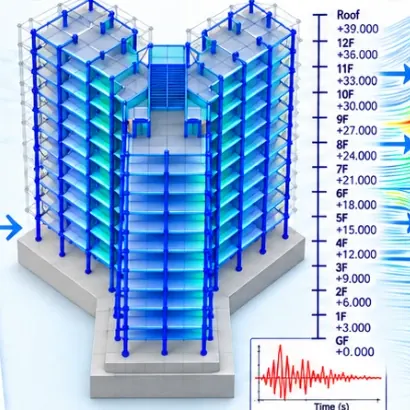
  • One real G+12 project, plan to foundation
  • IS 456 · IS 1893 · IS 13920 · IS 875 workflows
  • ETABS results checked by hand in Excel
  • Earthquake time history and CFD wind study
One G+12 building — every stage of its designSwipe →
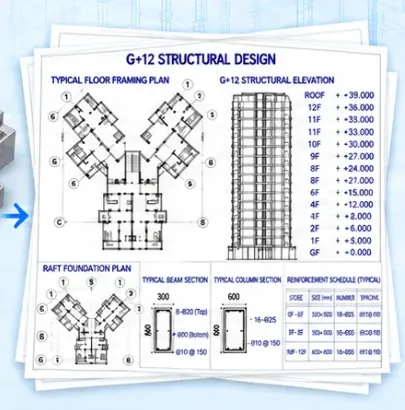
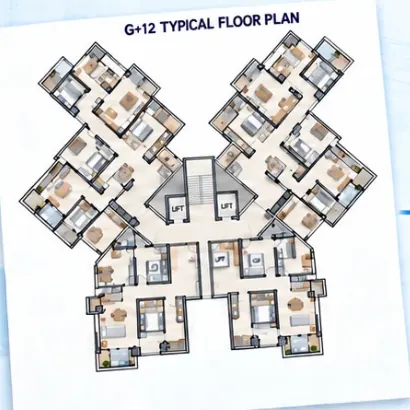
  1. 1Architectural planRead the G+12 plan and fix the beam–column layout
  2. 2ETABS time historyModel, load and run earthquake analysis
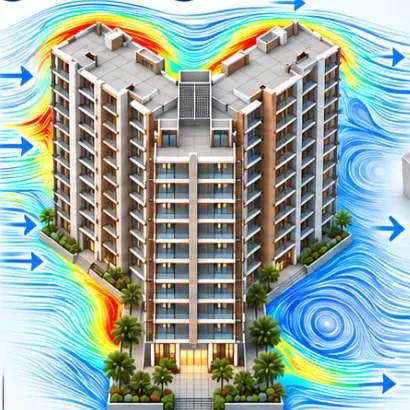
  3. 3CFD wind analysisStudy wind around the tower in Autodesk CFD
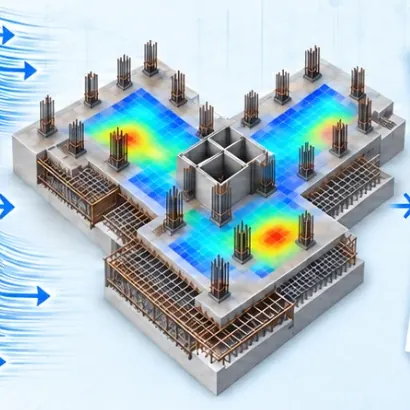
  4. 4Raft footing designDesign the raft foundation in SAFE
  5. 5Design sheetsDesign, manual checks and detailing

Illustration of the course workflow. Real screens from the lessons are shown further down.

Why this course is different

Software gives results. A structural engineer questions them.

Knowing which button to press in ETABS is the easy part. Design offices hire engineers who understand the loads, the behaviour and the code checks — and who can tell when a model is wrong.

  • Structural thinking before software

    Why a column goes where it goes, how the load travels down and how the layout decides the design.

  • Real loads, not textbook values

    Floor finishes, water tanks, lift machines, wind and earthquake — worked out to IS codes.

  • Read and question the results

    Drift, stiffness, torsion, base shear and deflection — and what to do when a check fails.

  • Check by hand, then trust

    Beams, columns and shear walls designed in software are verified with Excel manual-check sheets.

Excel manual check of an ETABS column design — from the advanced design lessons
The G+12 project

Follow one G+12 building from the plan to the foundation

These are real screens from the lessons. You build the same building alongside — every decision explained.

  1. G+12 architectural plan used in the course (AutoCAD)
    1Step 1 of 7

    Start from the architect’s plan

    Read the G+12 architectural plan, then decide where every column goes — its size, location and orientation — and draw the beam–column layout.

    AutoCAD
  2. The G+12 building in ETABS: typical floor plan and 3-D frame
    2Step 2 of 7

    Build the structural model

    Model all twelve storeys, the lift core and the overhead water tank in ETABS, exactly as the layout says.

    ETABS
  3. Slab loads assigned on the G+12 typical floor
    3Step 3 of 7

    Apply loads the way a design office does

    Floor finishes, partitions, live load, water in the tanks and the lift machine’s dynamic load — worked out, not guessed.

    ETABS · Excel
  4. Time-history result: storey displacement, drift, shear and overturning under the input ground motion
    4Step 4 of 7

    Earthquake analysis: ESM, RSM and time history

    Run equivalent static and response spectrum analysis to IS 1893, then a time-history analysis with recorded ground-motion files.

    ETABS · IS 1893
  5. RCDC: shear-wall reinforcement and section detail
    5Step 5 of 7

    Design, check by hand, then detail

    Design beams, columns and shear walls in ETABS and RCDC — and verify each one with an Excel manual check before you trust it.

    ETABS · RCDC · Excel
  6. SAFE: deflection contour of the G+12 floor slab
    6Step 6 of 7

    Design the slabs in SAFE

    Take the G+12 floor slabs into SAFE: check their deflection and work out the top and bottom reinforcement, strip by strip.

    SAFE
  7. SAFE: soil pressure under the G+12 raft (DL + LL), kN/m²
    7Step 7 of 7

    Finish with the raft foundation

    Take the building down to the ground: design the G+12 raft in SAFE and read its deflection and reinforcement.

    SAFE
Build this project with me

₹6,995 ₹14,999 · one-time payment

Software

Four software. One connected design workflow.

Each tool is taught where it belongs in a real project, so you learn the workflow — not four separate manuals.

  1. Plan
  2. Model
  3. Loads
  4. Analysis
  5. Design
  6. Foundation
  7. Detailing
Analysis & design

ETABS

Model the building, apply real loads and run equivalent static, response spectrum and time-history analysis.

Design & detailing

RCDC

Bring the ETABS model into RCDC and design and detail columns with full calculation reports.

Slab & raft design

SAFE NEW

Design the G+12 floor slabs and its raft foundation: deflection, soil pressure and strip reinforcement.

Dynamic wind study

Autodesk CFD NEW

Simulate wind flowing around towers to see velocity, pressure, wake and the effect of neighbouring buildings.

Also covered: STAAD Foundation AdvancedAutoCAD plansExcel load & check sheets
Advanced analysis

Go beyond basic modelling

Earthquake and wind decide most high-rise designs. This is the part most ETABS courses skip.

Earthquake analysis — IS 1893

  • Equivalent static method — base shear and its distribution up the building.
  • Response spectrum method — modes, mass participation, SRSS and CQC.
  • Time history method — run the G+12 tower against recorded ground motion.
  • Live sessions on the real R factor and on irregular buildings.

Wind analysis — IS 875 Part 3

  • Static wind — storey forces with the k1–k4 factors, with an Excel sheet.
  • Dynamic wind — the gust factor method for flexible buildings.
  • Wind tunnel testing — how it is done and when a project needs it.
  • Autodesk CFD NEW — simulate the wind around buildings yourself.
Autodesk CFD result from the course: wind flow and surface pressure on a cross-plan tower
New module · 47 min

Dynamic CFD wind analysis

Set up a virtual wind tunnel in Autodesk CFD, run it, and read velocity, pressure and force results — for one tower and for a group of towers that shelter or funnel the wind onto each other.

CFD is taught as a way to understand how wind behaves, alongside the IS 875 methods — not as a replacement for code-based design or a physical wind-tunnel test.

Try before you buy

Watch 7 demo lectures before you enroll

Real lectures from the G+12 project — architectural plan, ETABS modelling, lift loads, response spectrum, time history, wind forces and the wind tunnel test. About 54 min in all: free, no sign-up.

Swipe to see all 7 →

Real work

See the work behind the lessons

Screens from the lessons, and models our students built and sent in.

Swipe to see more →

Student workMulti-storey ETABS model — Deepak
Student workETABS model with plan and 3-D view — Dharmesh
Student workETABS model with plan and elevation views — Deepjoyti
From the lessonsAutodesk CFD: wind pressure on a cross-plan tower
From the lessonsExcel manual check of an ETABS column design
From the lessonsSTAAD Foundation Advanced: raft analysis contours

More: 67 course screenshots · student work gallery

Curriculum

Explore the complete curriculum

Start with the fundamentals, then take the G+12 building through analysis, design and foundations.

  • 11 modules
  • 53 video lessons
  • 27+ hours
  • 52 downloadable files
  • 7 demo lectures
1 ETABS fundamentals ETABS 2016 · 11 videos · 1 h 56 min · 8 files

The complete basic workflow on a small RCC building: model, load, analyse, design and detail.

  • Important subjects to focus on 1:12
  • Analysis & Design Intro 2:53
  • Basic UI of ETABS 2016 10:40
  • Basic UI - ETABS Files 1 file
  • Modeling in ETABS 2016 18:20
  • Modeling - ETABS Files 1 file
  • Assigning DL, LL, EQ & WL 19:46
  • Assigning loads - ETABS Files 1 file
  • Loads in Combination 7:20
  • Combined loads - ETABS files 1 file
  • Analysis in ETABS 2016 20:26
  • Analysis - ETABS files 1 file
  • ETABS Proof Check 5:54
  • Designing in ETABS 2016 14:28
  • Designing - ETABS files 1 file
  • Slab Designing 6:02
  • Slab Designing - Files 1 file
  • Detailing in ETABS 2016 9:49
  • Detailing - Files 1 file
2 G+12 project: from architectural plan to structural model AutoCAD · ETABS · 6 videos · 3 h 37 min · 4 files

Read the architect’s G+12 plan, fix the beam–column layout and build the full ETABS model.

  • Intro to Advance Course 9:10
  • G+12 Building Project 15:34
  • Architectural Plan G+12 1:03:45
  • Beam-Column Plan G+12 50:38
  • AutoCAD files 2 files
  • Advance Modeling G+12 Part1 40:05
  • Advance Modeling G+12 Part2 38:15
  • ETABS files 2 files
3 Practical loads ETABS · Excel · 3 videos · 1 h 27 min · 2 files

Dead, live, water-tank and lift machine loads worked out the way a design office does it.

  • Applying Dead & Live Loads 29:41
  • Applying Water Loads 21:32
  • Excel file: Load Calculations 1 file
  • Applying Lift Loads 35:49
  • Excel file: Lift Load Calculation 1 file
4 Earthquake analysis: ESM, RSM and time history ETABS · IS 1893 · 6 videos · 4 h 28 min · 6 files

Equivalent static, response spectrum and time-history analysis of the G+12 building.

  • Interesting History 19:08
  • Analysis Methods 22:15
  • ESM Method 41:15
  • ETABS file 1 file
  • RSM Method Part1 49:16
  • RSM Method Part2 51:08
  • ETABS Files 2 files
  • Time History Method 1:25:08
  • Ground Motion Files 2 files
  • ETABS File 1 file
5 Wind analysis and dynamic CFD wind study NEW ETABS · IS 875-3 · Autodesk CFD · 4 videos · 3 h 31 min · 3 files

Static wind, gust-factor dynamic wind, the wind-tunnel test — and a full Autodesk CFD wind simulation.

  • Apply Wind Force Static 49:26
  • Excel file: Wind Force Calculation 1 file
  • Dynamic Wind Force 1:27:13
  • Excel file: Gust Factor Calculation 1 file
  • Wind Tunnel Test 27:10
  • Sample Photos 1 file
  • Dynamic Wind Analysis in Autodesk CFD NEW 47:11
6 Load combinations, analysis checks and design ETABS · IS 456 · IS 13920 · 6 videos · 5 h 11 min · 14 files

Service and design combinations, the checks a model must pass, then beam, column and shear-wall design with manual checks.

  • Service & Design Combinations 1:12:46
  • Template File: Service Loads 3 files
  • Template File: Ultimate Loads 3 files
  • Structural Analysis Part1 49:15
  • Structural Analysis Part2 52:18
  • ETABS Files 2 files
  • Column Design & Manual Checks 56:10
  • Beam Design & Manual Checks 39:18
  • Shear Wall Design & Manual Checks 41:21
  • Excel file: Column Manual Check 1 file
  • Excel file: Beam Manual Check 1 file
  • Excel file: Shear Wall Manual Check 1 file
  • ETABS files 3 files
7 RCDC design and detailing RCDC · 3 videos · 1 h 37 min · 3 files

Import the ETABS model into RCDC and design and detail the columns with calculation reports.

  • ETABS to RCDC Import 28:31
  • ETABS File 1 file
  • Column Design Part 1 39:43
  • Column Design Part 2 29:41
  • Design Calculation File 1 file
  • RCDC Files 1 file
8 SAFE slab and raft foundation design NEW SAFE

Take the G+12 building into SAFE: design the floor slabs and the raft — deflection, soil pressure and strip reinforcement.

9 Foundations in STAAD Foundation Advanced STAAD Foundation · 3 videos · 34 min · 4 files

Isolated, combined and raft footings designed in STAAD Foundation Advanced.

  • Isolated Footing 11:10
  • Isolated footing files 1 file
  • Combined Footing 11:17
  • Combined footing files 1 file
  • Raft Footing 12:20
  • Raft footing files 2 files
10 Extras: steel roof truss and staircase ETABS · 3 videos · 41 min · 3 files

A steel roof truss and an RCC staircase, start to finish.

  • Steel Roof Truss Part 1 14:49
  • Steel Roof Truss Part 2 13:51
  • steel truss - etabs files 1 file
  • Staircase Design 12:52
  • Staircase - Files 2 files
11 Live session recordings Recorded live · 8 videos · 4 h 17 min · 5 files

Real questions from real projects: irregular buildings, lift shafts, soil reports, R factor and high-rise case studies.

  • Irregular Building Design 40:20
  • DXF & ETABS Files 2 files
  • Shear Walls & Lift Shaft 1:35:26
  • DXF & ETABS file 2 files
  • Site Soil Test & SBC 35:05
  • Soil Report PDF 1 file
  • Earthquake: ESM, RSM & THM 25:40
  • Real R Factor 12:15
  • Size, Location & Orientation 13:05
  • One World Trade Center & Jeddah tower 25:36
  • Steel Connection Design & Future Software 9:53
Get the full course

₹6,995 ₹14,999 · all 11 modules

Anil Suthar, course instructor
Your instructor

Learn from a practising structural engineer

Anil Suthar · Senior Structural Engineer · founder of fieldReady

Anil designs RCC buildings in practice and teaches the same way he works: the loads, the checks and the judgement calls that software does not make for you. Every lesson is recorded on a real project, with the reasoning spoken out loud — why this column size, why this load, why this result is wrong.

The demo lectures above are his. Watch one and decide for yourself.

RCC building designETABS · RCDC · SAFEIS 456 · 1893 · 13920 · 875Autodesk CFD
Student reviews

What students say

Very well structured design course I have come across so far as per the Indian IS Codes. I hope this was a part of my Civil Engineering course.

Riya NovalIIT Bombay
Got enrolled into the design course a few months back. The course is filled with practical knowledge and the concepts are covered in depth. This is the best practical RCC & steel design course I have come across.

Dheeraj NandvaniJIET, Jodhpur
Took the ETABS course first. The courses are focused on how work is actually done on the field. Learned so many things. A big thumbs up to Anil Sir for creating such courses.

Dharmesh SoniCivil Engineer
Is it right for you?

Who this course is for

Civil engineering students and freshers

Connect what you learnt in RCC and structural analysis with how a real building is modelled, analysed and designed — before your first job interview.

Working civil and structural engineers

Add earthquake time history, dynamic wind, CFD, RCDC and SAFE slab and raft design to your skills, and check your designs with confidence.

What you need

  • Basic RCC design knowledge from your degree or diploma
  • A Windows laptop or desktop to practise in the software
  • Basic English and an internet connection
Enroll today

Start learning complete building design

ETABS, RCDC, SAFE and Autodesk CFD — with earthquake time history, dynamic wind and manual design checks, on one real G+12 project.

  • All 11 modules · 53 HD video lessons · 27+ hours
  • 52 project files — ETABS models, AutoCAD plans, Excel sheets
  • New: Autodesk CFD dynamic wind and SAFE slab & raft design
  • Doubt support from practising engineers
  • ISO certificate · job assistance via email

Structural Design Course

₹6,995₹14,99953% off

One-time payment · instant access

Enroll Now

Secure checkout by RazorpayUPI, Visa, Mastercard, RuPay

Questions first? Ask us on WhatsApp

FAQ

Questions before you enroll?

I am a beginner. Is this course for me?

Yes, if you know basic RCC design from your degree or diploma. The first module teaches ETABS from scratch on a small building before the G+12 project starts, and every advanced topic is built up step by step.

Is everything included in the ₹6,995 fee?

Yes. The ETABS, RCDC, SAFE, Autodesk CFD and STAAD Foundation lessons, the G+12 project files, doubt support and the certificate are all part of this one course. There is nothing extra to buy from us — only the software itself, which you install on your own computer.

Which software versions are used?

The fundamentals module is recorded in ETABS 2016 and the advanced G+12 project in ETABS 20, together with RCDC, SAFE, Autodesk CFD, STAAD Foundation Advanced, AutoCAD and Excel.

Which IS codes does the course follow?

IS 456 for RCC design, IS 13920 for ductile detailing, IS 1893 for earthquake analysis and IS 875 for dead, live and wind loads.

Are software licences included?

No. The fee covers the lessons, project files and doubt support. You install the software on your own computer.

What does the Autodesk CFD module cover?

How wind actually flows around buildings: building the wind-tunnel-style model in Autodesk CFD, running it, and reading velocity, pressure and force results for a single tower and a group of towers. It sits next to the IS 875 static and gust-factor dynamic wind lessons, and is taught as a tool for understanding wind behaviour — not as a replacement for code-based design or a physical wind-tunnel test.

Are the lessons recorded or live?

Recorded HD lessons you can watch at any time, plus recordings of live sessions on irregular buildings, shear walls and lift shafts, soil reports and SBC, the R factor and high-rise case studies.

What language is the course in?

English.

Can I watch on my phone?

Yes — lessons play in the browser on a phone, tablet or laptop. To practise in the software you will need a Windows laptop or desktop.

Which files do I get?

ETABS models, AutoCAD plans, Excel load-calculation and manual design-check sheets, load-combination templates, ground-motion records and a sample soil report — attached to the lessons they belong to.

How does doubt support work?

Send your doubt on WhatsApp (+91 81074 49932) or email [email protected]. Doubts are answered by practising engineers.

Do I get a certificate?

Yes, an ISO certificate on completion. After payment you give us your postal address, and that is where it is sent.

How do I get the course after paying?

Straight away. After payment you choose a password and go to My Courses. If you already have a fieldReady account, the course is added to it — log in with your usual password.

How long can I access the course?

The course is added to your fieldReady account and stays in My Courses — there is no expiry date on it. Log in from any phone or laptop to watch.

Will this course help me get a job?

It teaches the workflow design offices expect from a new structural engineer, on a complete G+12 project you can talk through in an interview. Enrolled students also get job assistance via email. It is help with the search, not a placement guarantee.

How can I pay?

UPI, debit or credit card, net banking or wallet, through Razorpay’s secure checkout. Paying from outside India? WhatsApp us and we will help you pay by card or PayPal.

Can I get a refund?

Course fees are not refundable once paid — see our refund policy. That is why seven demo lectures are free to watch: please watch them before you enroll.

₹6,995₹14,99953% off
Enroll Now

Structural Design Course

Enroll for ₹6,995 ₹14,999

Your account is created automatically. After payment you set a password and start learning straight away.

+91
Razorpay · UPI · cards · net banking · walletsUPI, Visa, Mastercard, RuPay

Already have a fieldReady account? Use the same email and the course is added to it — or log in.

Log in

Use the email and password of your fieldReady account.

Demo lecture
Like what you see? The full course has 53 lessons.Enroll — ₹6,995